
Business Wi-Fi in Portland, OR & Vancouver, WA
Wi-Fi your business can rely on — offices, storefronts, and cafes get full coverage, a guest network, and a clean install.
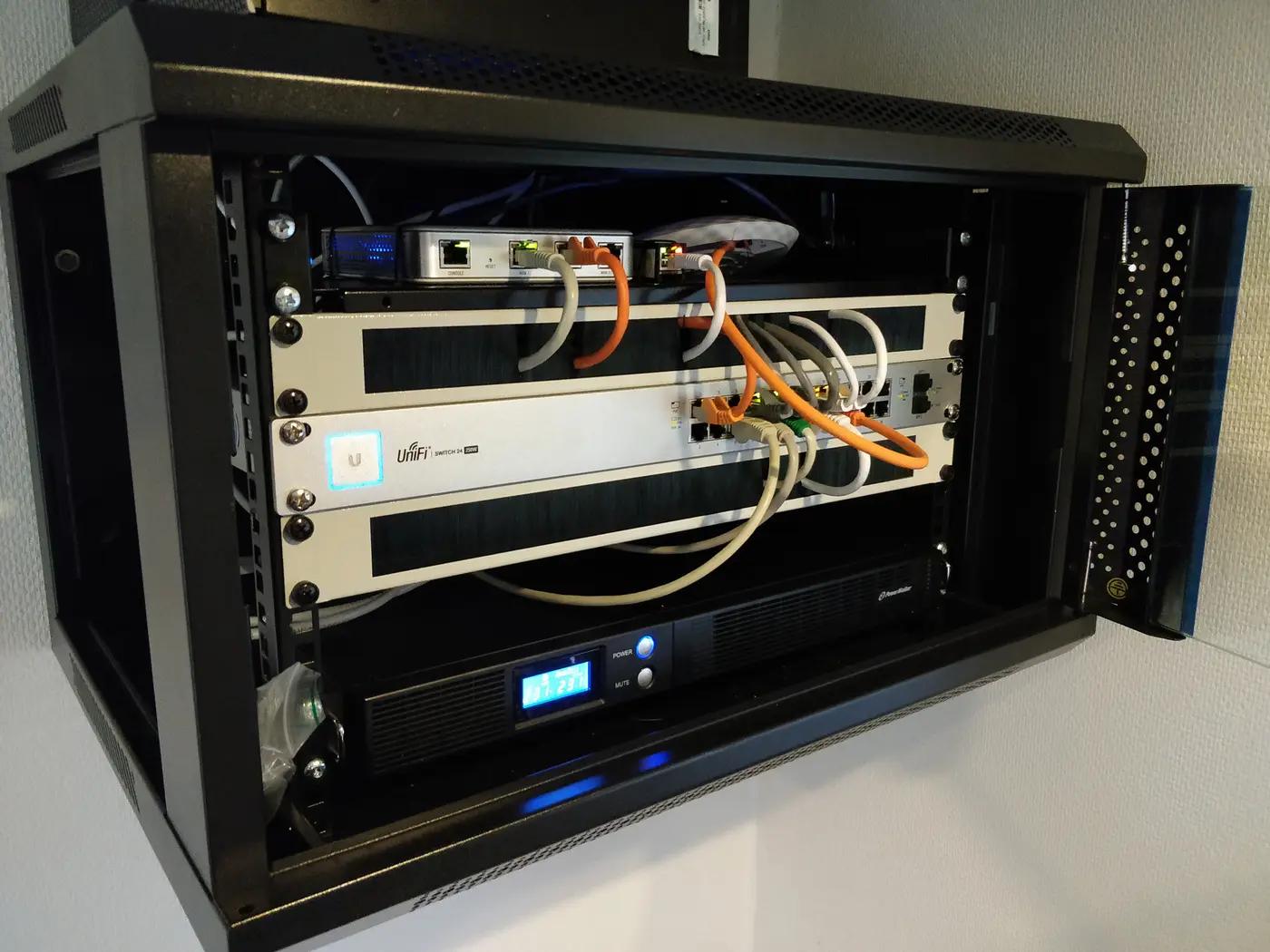
Business Wi-Fi planned and installed properly — a coverage survey of the space, business-grade access points wired where the signal needs to be, a separate guest network, and gear configured to recover on its own after a power blip.
What's Included
- Office & storefront Wi-Fi
- Coverage survey & AP placement
- Guest network setup
- Business-grade router setup
- Printer & device connectivity
- Network cabinet cleanup
What We Install & Repair
Wi-Fi for a whole business space, planned as a project instead of bought as a box. We survey the floor plan, place business-grade access points where the signal is actually needed, wire each one back to the rack, split staff and guest traffic onto separate networks, and leave the closet labeled. Offices, storefronts, cafes, and small warehouses are the territory here — one weak corner of a house is our residential Wi-Fi service, and hanging a single extra AP on an existing network is its own smaller job.
- On-site coverage survey and access point placement plan
- Multiple business-grade APs with wired backhaul
- Guest network with client isolation
- Staff, guest, and point-of-sale traffic separated by VLAN
- Business-grade router and firewall setup
- Printers, card terminals, and back-office devices brought online
- Network cabinet cleanup and labeling
Common Problems We Solve
Signal is fine at the counter and useless in the back room.
Older Portland storefronts put brick and masonry between the front and the back, and no consumer router pushes through that. We measure where the signal actually dies, then put a wired AP on the far side of the wall instead of a bigger antenna on the near side.
Customers on the guest Wi-Fi can see your printer.
That means everything is on one flat network. We rebuild it with VLANs — guests get internet and nothing else, staff devices see what they should, and the point-of-sale gets its own isolated lane.
Every power blip means someone crawling behind the desk rebooting boxes.
Business gear should come back on its own. We configure the router, switch, and APs to recover unattended after an outage, and a small UPS can keep short blips from touching the network at all.
A stack of consumer routers and repeaters bought one crisis at a time.
Repeaters chained together halve the speed at every hop. We replace the pile with one managed system — fewer radios, each one wired — and phones roam between APs without dropping.
Card readers time out during the lunch rush.
Payment terminals fail loudest when the room is fullest of phones. We move them to a wired drop or a priority VLAN, so a busy guest network cannot starve the till.
How It Works
Survey the space
We walk the floor with a meter, note the construction — brick, drop ceiling, mezzanine — count the devices that matter, and find where cable can actually get to.
Design and quote
You get a plain-language plan: how many APs, where each one goes, how the cable reaches it, and how staff, guest, and payment traffic will be separated.
Install and wire
APs mounted on ceilings or walls, each fed by its own cable run back to the rack, and the cabinet itself tidied and labeled while we are in it.
Configure, walk-test, hand off
Networks named and secured, guest isolation verified, roaming tested on a live call while walking the floor, printers and terminals reconnected, passwords and layout documented for whoever comes next.
What's Not Included
- Problems on the provider's side of the modem — if the connection into the building is the bottleneck, we show you the measurement to take to the carrier.
- New electrical outlets or circuits for the rack — that is line-voltage work for a licensed electrician; we plan around the power that exists.
- Ongoing managed-IT service — servers, workstations, and email belong with an IT firm; we build the network and hand it over documented.
- Trenching to a detached building — we can quote surface conduit, but excavation belongs to a different contractor.
What Affects the Price
- Square footage and AP count
- The survey decides how many access points the space genuinely needs; each one adds a mount, a cable run, and configuration time.
- Building construction
- A drop ceiling over open office is quick; exposed joists, masonry walls, and finished historic interiors slow every run down.
- Network complexity
- One staff network is simple; adding guest isolation, a POS VLAN, and priority rules adds configuration and testing time.
- Existing wiring
- Usable cable already in the walls shortens the job; a rat's nest that has to be traced and re-terminated lengthens it.
Frequently Asked Questions
How many access points does a shop or office actually need?
Construction decides, not square footage alone. A brick storefront can need more APs than an open office twice its size, because masonry eats signal. We count after measuring, not before.
Do the access points really need to be wired? I was told mesh would work.
Wireless mesh spends half of each radio talking to the next node, and it degrades exactly when the room fills up. In a business, every AP that can be wired should be; we reserve mesh for spots where a cable cannot go.
Can guests and staff share one internet connection safely?
Yes — that is what VLANs and client isolation are for. Guests get a network that reaches the internet and nothing inside the building: no printers, no point-of-sale, no back office.
What happens after a power outage?
A properly configured network comes back by itself — modem, router, switch, and APs rebooting unattended into a working state. If yours needs a human and a ritual, that is a configuration problem we fix.
Can you reuse equipment we already own?
Sometimes. Business-grade gear that fits the design stays; consumer routers pressed into commercial duty usually cannot do the traffic separation the plan calls for. During the survey we sort your hardware into keep and retire.
Areas We Cover
Free estimate
Request a Free Business Wi-Fi Setup Estimate
Tell us what you need and we'll get back to you with a quote. Photos welcome.